Connecting an agent over MCP
This is the main way Red Clippy is meant to be used. red-clippy mcp exposes
the whole application over the Model Context Protocol: scope and assets,
observations, methodology coverage, findings, evidence, the attack graph, the
scan engine and tool-output ingestion. A connected agent works the engagement
rather than answering questions about it.
You need a running server and an organization to connect to. The setup wizard creates both on first run, so if you have signed in once you already have everything this chapter needs. See Install and first run.
Architecture
Three processes, on one machine:
red-clippy serveholds the database and serves the panel on127.0.0.1:7337.- Your AI client (Claude Code, Codex, anything that speaks MCP) launches
red-clippy mcpas a child process and talks to it over stdin and stdout. red-clippy mcpis a thin proxy. It calls the REST API of the running server using an API key.
The panel cannot start or stop the MCP process; your client owns it. To cut off access, revoke the key.
Because step 3 goes over HTTP to 127.0.0.1, the server and the agent are on
the same machine in the normal setup. If your client runs elsewhere, point
RED_CLIPPY_URL at the machine running the server, and be aware that the API
key is then travelling over the network.
Issue an API key
Open Settings from the avatar menu.
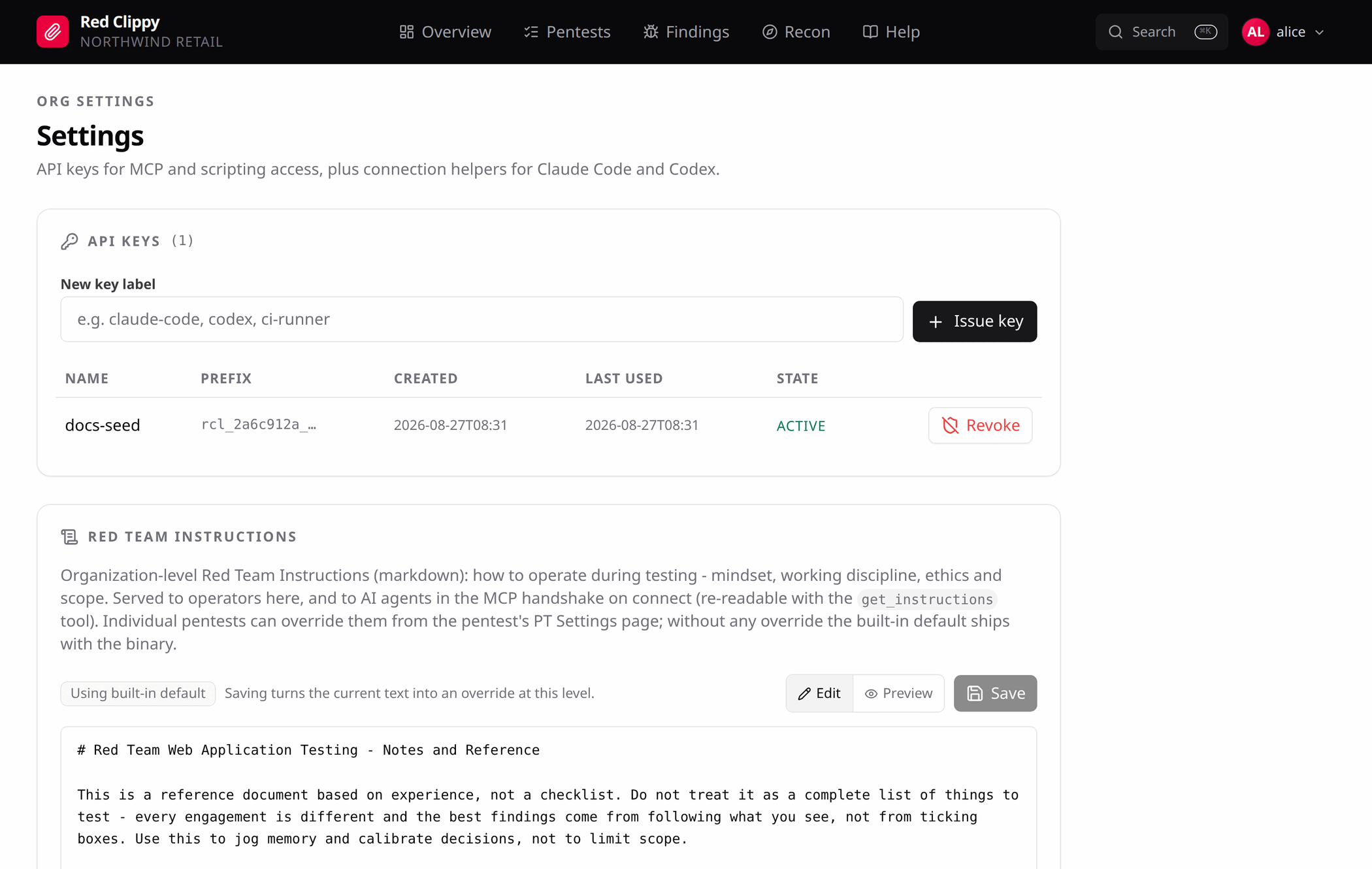
Type a label (claude-code, codex, ci-runner) and press Issue key. The
token appears once, in a banner, and is never shown again. Copy it now.
Tokens look like rcl_<prefix>_<secret>. The table keeps the prefix so you can
tell keys apart later, along with when each was created and last used.
Revoke disables a key immediately. Anything using it fails on the next call.
Keys are org-scoped. A key issued in one organization can only read and write that organization’s data, regardless of which organization your browser session is currently viewing.
To issue one from the command line instead:
red-clippy create-api-key --username alice --org xyz --name laptop
# -> rcl_<prefix>_<secret>   (shown once, store it now)
Copy the connection snippet
Scroll down to Connect MCP on the same page.
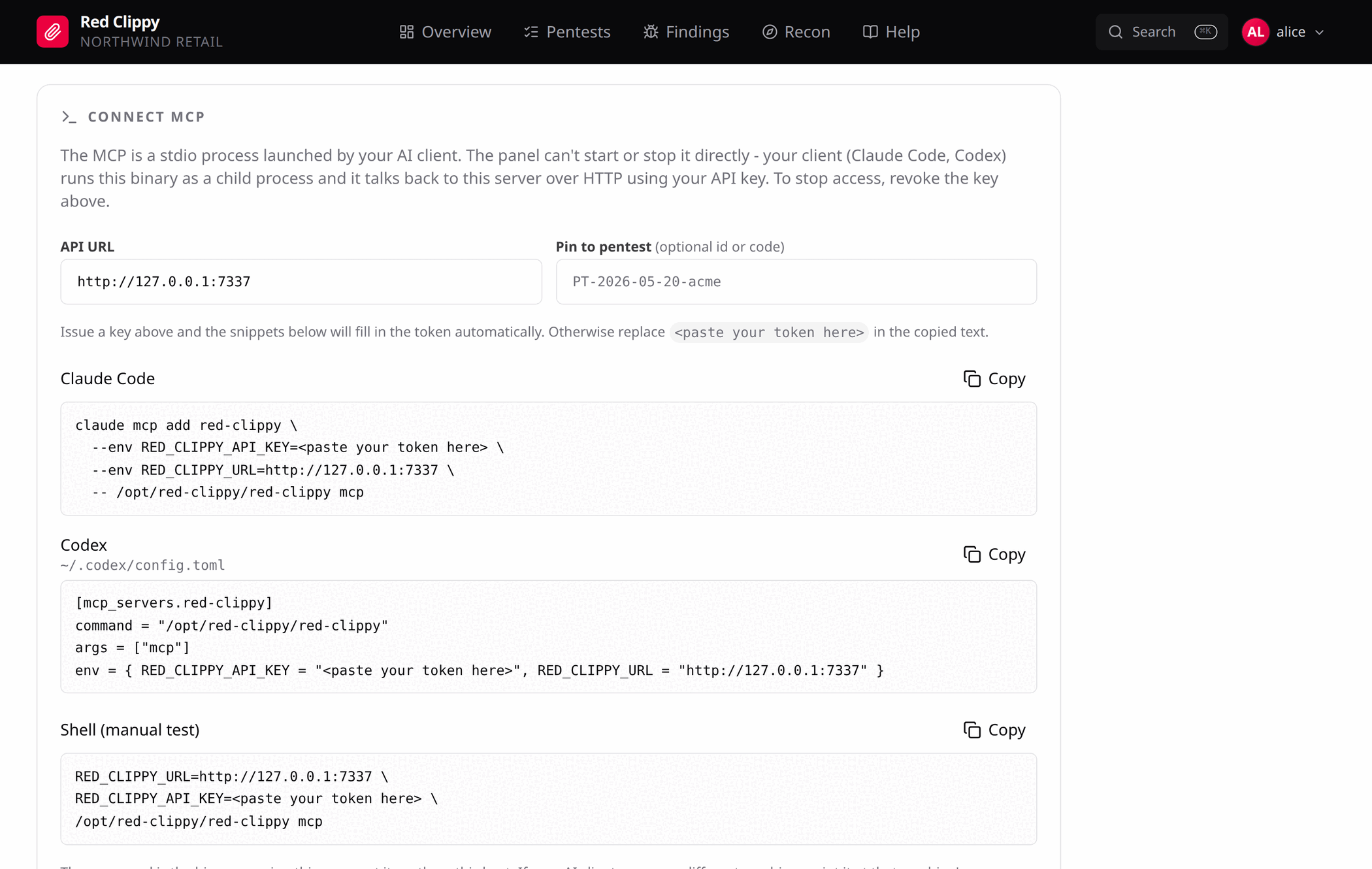
The snippets are filled in with this server’s URL and the path to the binary that is running it, so there is nothing to substitute by hand. If you issued a key a moment ago, the token is already in them; otherwise they carry a placeholder to replace.
Pin to pentest is optional. Put an engagement’s id or code in it and the
snippets gain RED_CLIPPY_PENTEST, which binds the session to that engagement.
Write tools then accept calls without a pentest_id and the server fills it
in, so you can say “log this finding” without naming the engagement every time.
Claude Code
claude mcp add red-clippy \
  --env RED_CLIPPY_URL=http://127.0.0.1:7337 \
  --env RED_CLIPPY_API_KEY=rcl_xxxx_yyyy \
  -- /path/to/red-clippy mcp
The name after add is only the label Claude Code shows. What matters is the
command after --, which is what actually gets launched. Use the binary’s full
path: Claude Code will not necessarily find red-clippy on its PATH. If you
copy the command from Connect MCP, the right path is already there.
Check it worked with claude mcp list; red-clippy should show as connected.
One folder per organization
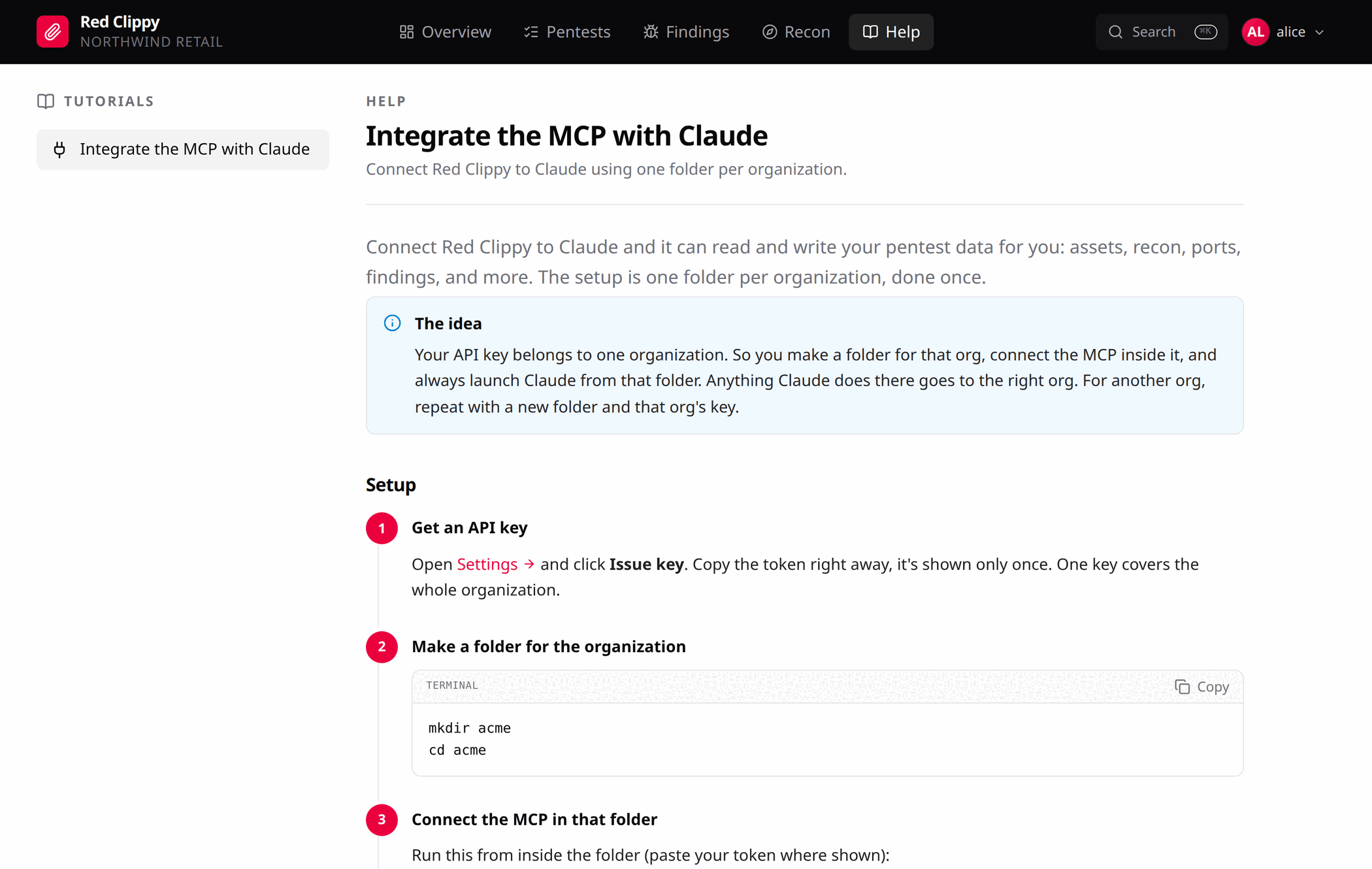
An API key belongs to one organization, so the cleanest arrangement is one working folder per client, with the MCP server added inside it:
mkdir xyz && cd xyz
claude mcp add red-clippy \
  --env RED_CLIPPY_URL=http://127.0.0.1:7337 \
  --env RED_CLIPPY_API_KEY=rcl_xxxx_yyyy \
  -- /path/to/red-clippy mcp
Claude Code launched from the xyz folder sees only that organization’s data;
launched from another client’s folder, only theirs. That mirrors the tenant
separation on the server, so one client’s findings cannot surface in another
client’s session.
Use the default scope for this. Do not add --scope user, which would make one
organization’s key active everywhere.
Your first organization came from the setup wizard. To add one per client, see Organizations and members.
The in-app Help page walks through the same setup with copyable commands.
OpenAI Codex CLI
In ~/.codex/config.toml:
[mcp_servers.red-clippy]
command = "/path/to/red-clippy"
args = ["mcp"]
env = { RED_CLIPPY_URL = "http://127.0.0.1:7337", RED_CLIPPY_API_KEY = "rcl_xxxx_yyyy" }
z.ai GLM
z.ai serves an Anthropic-compatible endpoint, so Claude Code can drive Red Clippy with GLM instead of an Anthropic model.
Add this to Claude Code’s settings: .claude/settings.local.json inside your
working folder to scope it to one engagement, or ~/.claude/settings.json to
apply it everywhere.
{
  "env": {
    "ANTHROPIC_BASE_URL": "https://api.z.ai/api/anthropic",
    "ANTHROPIC_AUTH_TOKEN": "your-z-ai-api-key",
    "ANTHROPIC_API_KEY": "",
    "API_TIMEOUT_MS": "3000000",
    "ANTHROPIC_DEFAULT_OPUS_MODEL": "glm-5.3",
    "ANTHROPIC_DEFAULT_SONNET_MODEL": "glm-5.3",
    "ANTHROPIC_DEFAULT_HAIKU_MODEL": "glm-5.3",
    "ANTHROPIC_SMALL_FAST_MODEL": "glm-5.3",
    "CLAUDE_CODE_SUBAGENT_MODEL": "glm-5.3"
  }
}
Two things to substitute:
your-z-ai-api-keywith your own key. Prefer the project-local.claude/settings.local.json, which Claude Code keeps out of git, so the key does not end up committed.glm-5.3with whichever model z.ai currently offers. Model names change, so check z.ai’s Claude Code guide for the current one and set every entry to it.
Then add the MCP server exactly as above. Red Clippy is unaffected by the choice of model: MCP runs client-side, so the tools behave identically whatever is behind the agent.
Any other MCP client
red-clippy mcp is a plain JSON-RPC 2.0 stdio server. It needs two things in
its environment and takes an optional engagement pin:
RED_CLIPPY_URL=http://127.0.0.1:7337 \
RED_CLIPPY_API_KEY=rcl_xxxx_yyyy \
/path/to/red-clippy mcp --pentest PT-2026-Q3-XYZ
| Variable | Flag | Meaning |
|---|---|---|
RED_CLIPPY_URL | --url | Base URL of the running server. Defaults to http://127.0.0.1:7337. |
RED_CLIPPY_API_KEY | --api-key | The org-scoped token. Required. |
RED_CLIPPY_PENTEST | --pentest | Numeric id or exact code of an engagement to pin the session to. Optional. |
Protocol versions 2024-11-05, 2025-03-26 and 2025-06-18 are all accepted.
Run one MCP entry per active engagement and switch engagements by switching servers.
Verifying the connection
Ask the agent directly: “can you access the Red Clippy MCP?” A connected client will confirm it, and can usually name the tools it now has.
Follow up with “list my pentests”. If it comes back with the engagements from your organization, the URL, the key and the tool surface are all working.